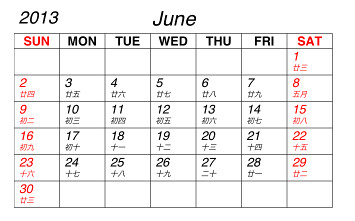
lunar-2013-06
本文引用自changyy - iOS 開發筆記 - 國曆轉農曆計算 (Chinese Lunar Calendar)


iOS 開發筆記 - 國曆轉農曆計算 (Chinese Lunar Calendar)


zer931 發表在 痞客邦 留言(0) 人氣()

本文引用自peeress - PHP - 一個好用的分頁函數
如果你跟我一樣是剛入門沒幾天的PHP新手
一定要來看看這個方便的PHP函數

zer931 發表在 痞客邦 留言(0) 人氣()

from http://furnacedigital.blogspot.tw/2012/07/class.html
在兩個不同的 Class 之間傳遞參數的方法
 

zer931 發表在 痞客邦 留言(0) 人氣()

from http://forth.pixnet.net/blog/post/25397785-key-value-coding
 
NSObject提供兩個method:

zer931 發表在 痞客邦 留言(0) 人氣()

from:http://calamaryshop.blogspot.tw/2011/12/cc.html

箭頭(->)與點(.)
1. in C++ Struct:
struct MyStruct {
  int member_a;
};
1.1 如果有變數 MyStruct s,對其中成員的取用為:
MyStruct s;
s.member_a = 1;
1.2 如果採用指標方法存取MyStruct * ps,相對的存取方式必須使用箭頭:
MyStruct * ps;
ps->member_a = 1;

zer931 發表在 痞客邦 留言(0) 人氣()

C Gossip: malloc()、free()、calloc() 與 realloc()
from http://caterpillar.onlyfun.net/Gossip/CGossip/MallocFree.html


到目前為止,您都是事先宣告好所要使用的變數,當程式開始執行時,這些變數就會自動被配置記憶體空間。
然而有時有些變數並不知道何時會被使用,您希望在使用到的時候再配置空間給變數,並在變數不使用的時候,將變數所佔有的空間還給記憶體,這時候我們可以使 用malloc()與free()函式。
舉個簡單的例子來說,您可以在程式中以動態的方式來配置一個int型態大小的記憶體,例如:

int *ptr = malloc(sizeof(int));


在這段程式中,malloc()運算子會配置一個int所需要的空間,並傳回該空間的位址,所以您使用指標ptr來儲存這個位址,這段程式只配置空間但不初始空間中 的儲存值
以下使用一個簡單的程式來示範動態配置的使用:

#include <stdio.h>
#include <stdlib.h>
int main(void) {
int *ptr = malloc(sizeof(int));
printf("空間位置:%X\n", ptr);
printf("空間儲存值:%d\n", *ptr);
*ptr = 200;
printf("空間位置:%X\n", ptr);
printf("空間儲存值:%d\n", *ptr);
free(ptr);
return 0;
}


執行結果:


空間位置:A31330
空間儲存值:10717912
空間位置:A31330
空間儲存值:200


使用malloc()函式動態配置的空間,在整個程式結束前並不會自動歸還給記憶體,您必須使用free()函式將這個空間還給記憶體,如上面的程式在結束前所作的動 作,在這個程式中,雖然顯示完畢後程式也就結束,但這邊還是 示free() 的用法,而這也是個好習慣,日後您的程式在持續執行過程中若大量使用malloc()而 沒有適當的使用free()的話,由於空間一直沒有歸還,最後將導致整個記憶體空間用盡。
接下來看一個簡單的動態記憶體配置的應用,您知道陣列使用的一個缺點,就是陣列的大小必須事先決定好,然而有時候您無法知道我們會使用多大的陣列,或者希 望由使用者自行決定陣列大小,這時候您就可以使用動態記憶體配置加上指標運算來解決這個問題,先說明陣列動態配置的方式,如下所示:

int *arr = malloc(1000 * sizeof(int));


這段程式碼動態配置了1000個int大小的空間,並傳回空間的第一個位址,配置後的空間資料是未知的,您可以使用calloc()來宣告空間配置,例如:

int *arr = calloc(1000, sizeof(int));


這個程式將宣告1000個int大小的空間,並將所有的空間值初始為0。同樣的,使用malloc()或calloc()配置得來的空間,在不使用時應該使用free()歸還給記憶體,方法如下:

free(arr);


下面這個程式是個陣列動態配置的簡單示範:

#include <stdio.h>
#include <stdlib.h>
int main(void) {
int size = 0;
printf("請輸入陣列長度:");
scanf("%d", &size);
int *arr = malloc(size * sizeof(int));
int i;
printf("顯示元素值:\n");
for(i = 0; i < size; i++) {
printf("arr[%d] = %d\n", i, *(arr+i));
}
printf("指定元素值:\n");
for(i = 0; i < size; i++) {
printf("arr[%d] = ", i);
scanf("%d" , arr + i);
}
printf("顯示元素值:\n");
for(i = 0; i < size; i++) {
printf("arr[%d] = %d\n", i, *(arr+i));
}
free(arr);
return 0;
}


執行結果:


顯示元素值:
arr[0] = 25892816
arr[1] = 8983344
arr[2] = 0
arr[3] = 0
指定元素值:
arr[0] = 1
arr[1] = 2
arr[2] = 3
arr[3] = 4
顯示元素值:
arr[0] = 1
arr[1] = 2
arr[2] = 3
arr[3] = 4


您也可以使用指標來模擬二維陣列,只要清楚二維陣列中的兩個維度的索引值之位移量就可以了,這在 二維陣列 中有談到了,下面這個程式是個簡單的示範:

#include <stdio.h>
#include <stdlib.h>
int main(void) {
int m = 0;
int n = 0;
printf("輸入二維陣列維度(m*n):");
scanf("%d*%d", &m, &n);
int *ptr = malloc(m * n * sizeof(int));
int i, j;
for(i = 0; i < m; i++) {
for(j = 0; j < n; j++) {
*(ptr + n*i + j) = i + j;
}
}
for(i = 0; i < m; i++) {
for(j = 0; j < n; j++) {
printf("%d\t", *(ptr+n*i+j));
}
putchar('\n');
}
free(ptr);
return 0;
}


執行結果:


輸入二維陣列維度(m*n):2*3
0       1       2
1       2       3


如果要改變先前配置的記憶體大小,則可以使用realloc(),您必須先使用malloc()、calloc()或realloc()配置記憶體,而後使用所得到的位址來使用realloc()重新配置記憶體大小,例如:

#include <stdio.h>
#include <stdlib.h>
int main(void) {
int size = 0;
printf("請輸入陣列長度:");
scanf("%d", &size);
int *arr1 = malloc(size * sizeof(int));
int i;
printf("指定元素值:\n");
for(i = 0; i < size; i++) {
printf("arr1[%d] = ", i);
scanf("%d" , arr1 + i);
}
printf("顯示元素值:\n");
for(i = 0; i < size; i++) {
printf("arr1[%d] = %d\n", i, *(arr1+i));
}
int *arr2 = realloc(arr1, sizeof(int) * size * 2);
printf("顯示元素值:\n");
for(i = 0; i < size * 2; i++) {
printf("arr2[%d] = %d\n", i, *(arr2+i));
}
printf("arr1 address: %d\n", arr1);
printf("arr2 address: %d\n", arr2);
free(arr2);
return 0;
}


執行結果:


請輸入陣列長度:2
指定元素值:
arr1[0] = 1
arr1[1] = 2
顯示元素值:
arr1[0] = 1
arr1[1] = 2
顯示元素值:
arr2[0] = 1
arr2[1] = 2
arr2[2] = 1599361871
arr2[3] = 1128613955
arr1 address: 5771032
arr2 address: 5771032


在這邊要注意的是,上例中,arr1與arr2的位址相同並不保證,realloc ()會需要複製資料來改變記憶體的大小,若原位址有足夠的空間,則使用原位址調整記憶體的大小,若空間不足,則重新尋找足夠的空間來進行配置,在這個情況下,realloc()前舊位址的空間會被釋放掉,因此,您必 須使用realloc()所傳回的新位址,而不該使用舊位址,若realloc()失敗,則傳回空指標(null)。最好是進行檢查:

int *arr2 = realloc(arr1, sizeof(int) * size * 2);
if(!arr2) arr1 = arr2;
....
free(arr1);


BloggerAds 廣告成語皇朝APP玩家心得大募集在部落格寫下200字的玩後心得,就有機會獲得3次抽大獎機會! 馬上了解GO更多訊息..「搶便宜」,雙北市房價下殺千萬千萬以下入住台北不是夢,首推搶購地產Apple物件,小資首購族不可錯過!!更多訊息..


zer931 發表在 痞客邦 留言(0) 人氣()

Objective-C 的 Nil、nil 與 NULL
from http://furnacedigital.blogspot.tw/2011/08/objective-c-nilnil-null.html
 

zer931 發表在 痞客邦 留言(0) 人氣()

在COCOS2D內建立UIView
from http://bearuwork.blogspot.tw/2011/10/cocos2duiview.html

zer931 發表在 痞客邦 留言(0) 人氣()


UIView 同時移動、旋轉、放大的作法
from http://servinggear.blogspot.tw/2012/02/uiview.html
 

zer931 發表在 痞客邦 留言(0) 人氣()


iphone ios NSImage CIImage CGImage 区别及应用Quartz, Quartz Extreme, Quartz 2D Extreme, Core Image
from http://blog.csdn.net/linzhiji/article/details/6738462
分类: iphone 2011-09-01 11:07 1156人阅读 评论(0) 收藏 举报

zer931 發表在 痞客邦 留言(0) 人氣()


initWithNibName 和 loadNibNamed 的区别
from http://www.cnblogs.com/ghj1976/archive/2012/05/28/2521840.html


UIViewController initWithNibName

这时候是延迟加载


主要代码如下:


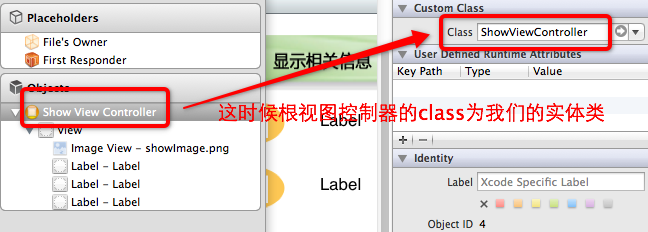
            ShowViewController * showMessage = [[ShowViewController alloc]


                                                initWithNibName:@"ShowViewController" bundle:nil];


            self.showViewController = showMessage;


            [showMessage release];


这时候是延迟加载,这个View上的控件是 nil 的


self.showViewController.show_Topic 

只有到 需要显示时,才会不是 nil


 [saveViewController.view removeFromSuperview];


[self.view insertSubview:showViewController.view atIndex:0];


这时候 xib 文件的要求:


NSBundle loadNibNamed


实时加载。

这时候的代码:


NSArray * nib = [[NSBundle mainBundle] loadNibNamed:@"Save3ViewController" 


                                                          owner:self options:nil] ;


self.showViewController = [nib lastObject];
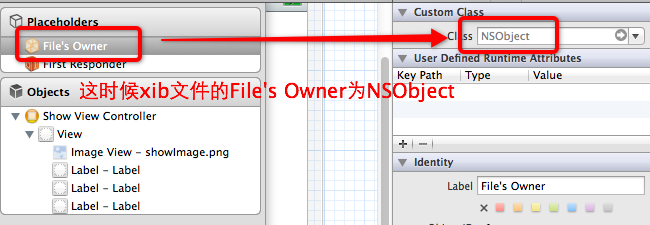


这时候的xib文件


如果用 loadNibNamed 加载 initWithNibName 用到格式的 xib 文件,就会报错误:


setValue:forUndefinedKey
loaded the...nib but the view outlet was not set


loadNibNamed和initWithNibName需要加载的xib文件是不一样的。initWithNibName需要加载的xib文件的File Owner应改是需要加载的类,

而loadNibNamed需要加载的xib文件的File Owner为NSObject。

http://www.cnblogs.com/GoGoagg/archive/2011/06/09/2076456.html


when using loadNibNamed:owner:options:, the File's Owner should be NSObject, the main view should be your class type, and all outlets should be hooked up to the view, not the File's Owner.

http://stackoverflow.com/questions/46220/iphone-app-crashing-error-question


参考资料:


从xib/nib加载UIViewController/或其子类
http://www.cnblogs.com/GoGoagg/archive/2011/06/09/2076456.html


iPhone App Crashing - Error Question
http://stackoverflow.com/questions/46220/iphone-app-crashing-error-question


zer931 發表在 痞客邦 留言(0) 人氣()

[objective C] UIEdgeInsetsMake 拉伸操作的部分的大小
from http://hopeyoung1208.blogspot.tw/2012/02/objective-c-uiedgeinsetsmake.html 

UIEdgeInsetsMake(0,0,0,0)指定了不進行拉伸操作的部分的大小,顺序是上、左、下、右4个边。
 
scrollView.contentInset = UIEdgeInsetsMake( 0.0f, 0.0f, 60.0f, 0.0f);
 
這樣就是往下拉的時後有60的間距,往上、左、右都沒有間距。

zer931 發表在 痞客邦 留言(0) 人氣()

Blog Stats
⚠️

成人內容提醒

本部落格內容僅限年滿十八歲者瀏覽。
若您未滿十八歲,請立即離開。

已滿十八歲者,亦請勿將內容提供給未成年人士。